No. 82Technology3 minviews 38
Published by GK Library Annex
Why do waves appear when you photograph a monitor?
The screen looks fine to your eyes, but full of stripes in a photo. Is your phone broken?
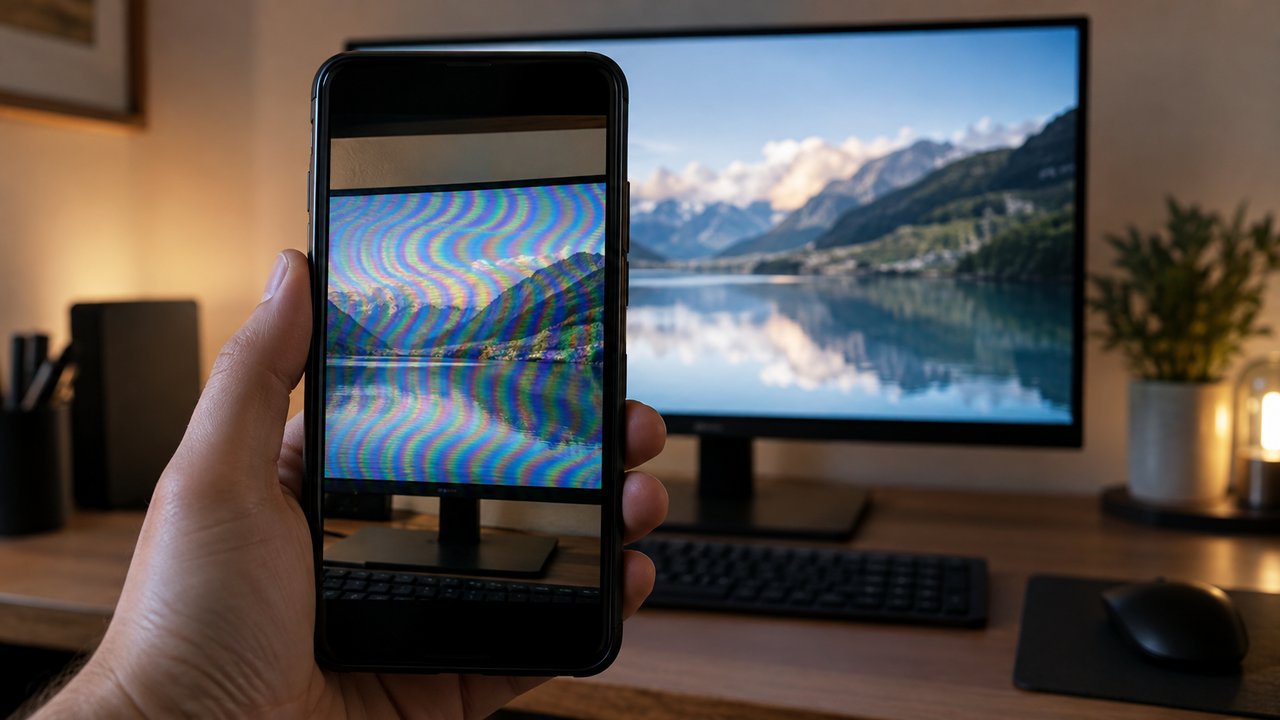
The wavy pattern that appears when you photograph a monitor with your phone is not a fault. It occurs when the screen's closely spaced dots overlap slightly out of alignment with the camera sensor's closely spaced cells. This is called moiré.
When two fine grids overlap
A monitor has tiny points of light arranged in a grid, and a phone camera sensor has tiny light-receiving cells arranged in a grid too. If their spacing or angles are nearly the same but do not match exactly, the dots line up with cells in some places and fall between them in others.
Aligned areas photograph as bright and misaligned areas as dark, producing thick stripes that were not on the original screen. It is the same effect as the broad waves you see when you overlap two insect screens.
Why do your eyes not see it?
The light-sensitive cells in our eyes are not arranged in a regular grid like a camera sensor. They are therefore less likely to form a regular mismatch with the screen's dots, so the pattern does not appear. For the same reason, a checked shirt can look as though stripes are rippling across it on TV. People appearing on broadcasts are often told to avoid clothes with fine patterns.
Would a better camera avoid it?
It's easy to blame a low-resolution phone, but expensive cameras get it too. Adobe explains that moiré can appear even in very high-resolution photos when the pattern and angle line up.
That's why many digital cameras place a thin layer called an optical low-pass filter in front of the sensor, deliberately softening very fine patterns the sensor can't capture cleanly. Nikon notes that its D800E, which drops this filter, is slightly sharper but more likely to show moiré than the D800, which has one. It's a trade-off between sharpness and wavy patterns.
How to take photos with fewer waves
Tilting the phone slightly, or moving a little closer to or farther from the screen, changes how the two grids misalign and makes the pattern fainter. Zooming in a little with your fingers, or setting the focus slightly off the screen, also helps.
Try this when you want to keep a lecture slide or TV subtitles. Scanning magazine photos can produce the same pattern, as printed dots overlap the scanner's cells, so some scanner software includes a feature to remove moiré. If it's your own phone or computer screen, simply taking a screenshot gives the cleanest result.
Related reads
Waves in a screen photo come from the screen's dots overlapping out of alignment with the camera sensor's cells. Changing the angle or distance can reduce them.
Notes and references · Moiré pattern (Wikipedia) · Nikon · Adobe. Based on Wikipedia for the explanation of interference patterns from two slightly misaligned grids and the TV screen and patterned clothing examples, Nikon's ‘Moiré & False Color’ for optical low-pass filters and the D800/D800E comparison, and Adobe for moiré appearing even at high resolution. The part about the eye's photoreceptor arrangement is a general explanation.
Editorial standardsReport an error
Quick quiz